Archive for the ‘DVMUG’ Category
DVMUG Zoom Meeting Tuesday, 10-13-26, 3 pm, Pacific
 October 6th, 2026 | Author: dvmuga
DVMUG Home Page

DVMUG members can find the Zoom meeting login in the weekly DVMUG News email or on the DVMUG BBS.
Read more here for tips on how to use Zoom

Previous DVMUG Zoom Meetings at,
DVMUG YouTube Channel
 Posted in
 DVMUG iOS Boot Camp Saturday, 10-17-26, 10am
October 5th, 2026 | Author: dvmuga
DVMUG Home Page
DVMUG iOS Boot Camp
Saturday, 10-17-26, 10 am to Noon

DVMUG Office
396 Civic Drive C
Pleasant Hill
 Get a map to the DVMUG Office
Host: Mike Dickerson
925-787-6391
Michael522@pacbell.net

Co-Host: Rick Calicura
925-405-5811
Rick_Calicura@dvmug.org

This live meeting starts at 10 AM on Saturday and runs until noon, or later if needed.
iOS tips and tricks, odds and ends.
In addition to our live meeting, we will do Zoom for those who cannot attend in person.
This will be an ongoing SIG if attendance warrants it.
Please don’t forget to wear a mask if you have concerns about being in a group,

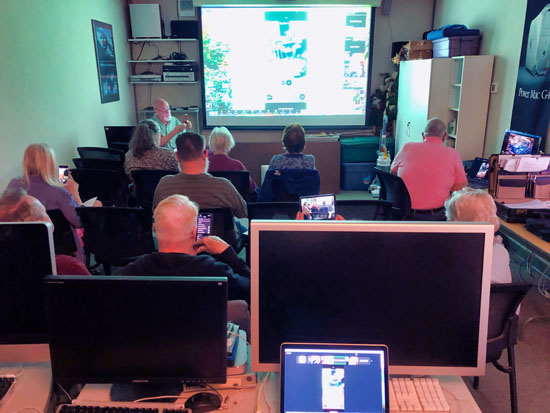
DVMUG Hands-On Mac Saturday, 10-3-26, 10am
October 2nd, 2026 | Author: dvmuga
DVMUG Home Page

DVMUG Hands-On Mac
Saturday, 10-3-26, 10 am to Noon
DVMUG Office, 396 Civic Drive C, Pleasant Hill
Get a map to the DVMUG Office
Host: Rick Calicura 925-405-5811 Rick_Calicura@dvmug.org
Co-Host: John Sobrero 925-3356789 John_Sobrero@dvmug.org

Hands-On Mac! is a brand-new DVMUG program designed to introduce you to the Mac from the ground up. This program will alternate with the Mac Clinic every other month and meet on the first Saturday of the month.
This program focuses exclusively on the Mac—we will not be discussing the iPhone or iPad. Join us to learn about keyboard shortcuts, file organization, various Mac applications, and to get answers to your Mac questions.
John and Rick hope to see you there!
DVMUG Picnic 9-1-26
August 24th, 2026 | Author: dvmuga
DVMUG Home Page
DVMUG Picnic 9-1-26
Hidden Valley Park – Beech Picnic Area
Redwood Dr & Center Ave
Martinez

Get a map to Hidden Valley Park
goo.gl/maps/61ghP4p8XKHLwzm86
As always, the group will supply the meat and drinks, and you are encouraged to bring a dish or a dessert. This event is always a lot of fun and we encourage you to join us for what will be a very enjoyable time with good food and good company.
Previous Picnic Photos

Hidden Valley Park – Beech Picnic Area


DVMUG goes to the Computer History Museum 8-12-26
August 3rd, 2026 | Author: dvmuga
DVMUG Home Page
DVMUG goes to the Computer History Museum
Where: Meet at the DVMUG office at Noon
Get a map to the DVMUG OfficeWe’re carpooling to the museum. To keep cars to a minimum, please volunteer to drive if you have extra seats. Otherwise, feel free to drive yourself and meet us there. We are heading to Mountain View at noon to avoid heavy traffic. We will also have an early dinner there to skip the evening rush on our way back.
Admission
Senior 65+ $16.50
Adult $21.50
You can purchase tickets in advance
Special Exhibit for Apple @ 50
Rare Prototypes: A display of some of the most iconic Apple products from the CHM collection and beyond, including the Apple I, Apple IIc, Lisa, Macintosh, Newton, iPod, and iPhone. Learn about Apple’s founding and how it has pushed boundaries by “thinking different” throughout its 50-year history. The exhibit runs until September 7, 2026.
Computer History Museum
1401 N. Shoreline Blvd
Mountain View
Get a map to the Computer History Museum
Jason Snell DVMUG Zoom meeting 6-23-26 on Youtube WWDC 2026
June 23rd, 2026 | Author: dvmuga
DVMUG Home Page
Jason Snell DVMUG Zoom meeting
Topic: Apple WWDC 2026
Meeting length: 1 hr 7 min


Jason has written for Macworld for 25 years and was lead editor for over a decade. He writes about Apple at Six Colorsand podcasts at Relay FM and The Incomparable. 
Previous DVMUG Zoom Meetings at, DVMUG YouTube Channel
David Pogue at the DVMUG Zoom Meeting 5-26-26 on YouTube
May 26th, 2026 | Author: dvmuga
DVMUG Home Page
David Pogue at the DVMUG Zoom Meeting 5-26-26 on YouTube
Meeting length:
Watch here
|
|
 |

A funny, fascinating, illustrated talk about Apple’s history, about the book, some behind-the-scenes stories from Apple’s history, and questions.
This book lavishly illustrates the first 50 years of Apple’s history through stunning, full-color photographs.
Instant New York Times Bestseller
In time for Apple’s 50th anniversary, CBS Sunday Morning correspondent David Pogue tells the iconic company’s entire life story: how it was born, nearly died, was born again under Steve Jobs, and became, under CEO Tim Cook, the most valuable company in the world. The book features new facts that correct the record, illuminate its subversive culture, and fresh interviews with the legendary figures who shaped Apple into what it is today.
AppleFirst50.com
Previous DVMUG Zoom Meetings at DVMUG YouTube Channel
Donate to DVMUG.
Click here to learn how to donate.
DVMUG Class Donation
October 1st, 2025 | Author: dvmuga
DVMUG Home Page
Donations are appreciated to help offset the cost of the classes.
Suggested donation $20.
Donate to DVMUG either by sending a check to
DVMUG
PO Box 5031
Concord, CA 94524
OR
Click the button below, labeled “Donate now with PayPal.”
Just follow the directions and make your donation.

Donate to DVMUG
October 1st, 2025 | Author: dvmuga
DVMUG Home Page
Please feel free to donate to DVMUG either by sending a check to
DVMUG
PO Box 5031
Concord, CA 94524
OR
Click the button below, labeled “Donate now with PayPal.”
Just follow the directions and make your donation.
How to use Zoom
August 28th, 2025 | Author: dvmuga
DVMUG Home Page
Download the Zoom Client for Meetings app for macOS:
macOS 10.11 or later
zoom.us/download
Download the Zoom Cloud Meetings app for iPhone and iPad:
iOS 8.0 or later
apps.apple.com/us/app/zoom-cloud-meetings/id546505307
Become a videoconferencing pro with these tips
“Take Control of Zoom” author Glenn Fleishman shares a host of tips that can help you tune your setup and improve your confidence.
Read more here
Tips to take your video conferencing to the next level
If you use your Mac to attend video meetings for work or school, here are some tips that can increase the quality of your video and help you look more professional.
Watch here
20 tips for using Zoom on your Mac
Many of us use Zoom on our Macs for meetings, classes, or get-togethers. Zoom is a powerful video conferencing app with many useful hidden features. Learn how to test your audio before a meeting, use a video background, send reactions and nonverbal feedback, and start breakout meetings.
Watch here